
Once your quiz funnel is ready, it's time to get it live on your store. bluebarry integrates with all major eCommerce platforms—here's how to set it up.
Platform-specific plugins
We have native integrations for the most popular platforms:
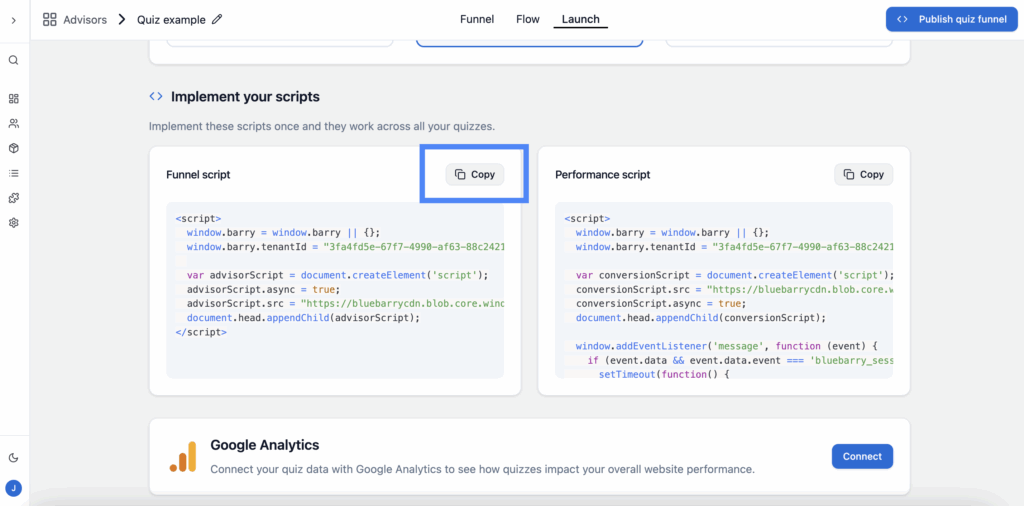
Getting your funnel script
For any platform (or if you prefer manual implementation):
- Open your quiz funnel in bluebarry
- Click the Share button in the top right
- Copy the script code provided
Implementation options
Choose how your quiz funnel appears on your site:
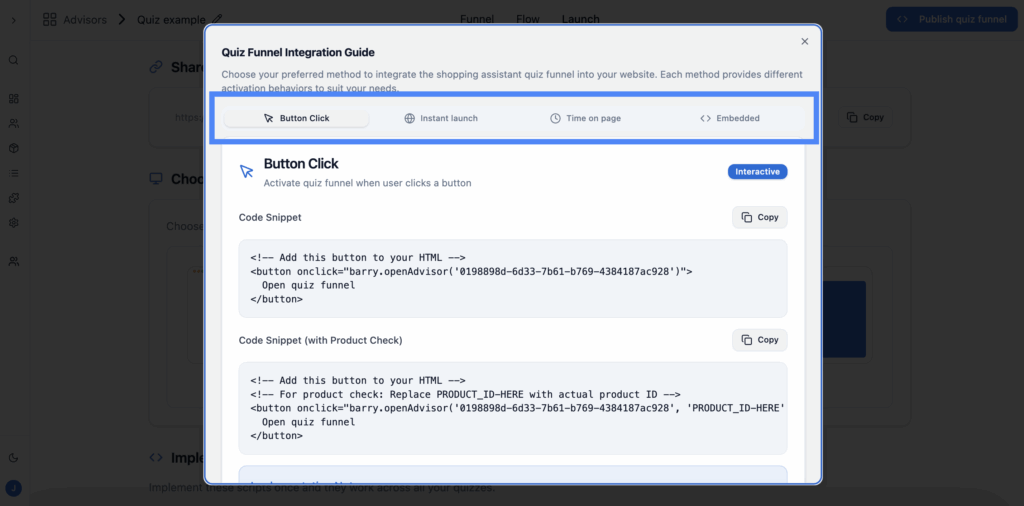
Option 1: Button click
Add a button anywhere on your site that opens the quiz in a popup when clicked. Perfect for homepage CTAs, navigation menus, or product pages.
Option 2: Direct link
Get a standalone URL for your quiz. Use this for email campaigns, social media posts, or QR codes. Visitors go directly to a full-page quiz experience.
Option 3: Time on page
Automatically show the quiz after visitors spend a certain amount of time on your site. Great for engaging browsers who haven't found what they're looking for yet.
Option 4: Embedded
Embed the quiz directly into any page as inline content. Ideal for dedicated landing pages or "product finder" sections.
💡 Pro tip
Test different implementation methods to see what works best for your audience. Button clicks often convert well on product pages, while time-on-page triggers can rescue confused browsers.